Steam
Add to Cart
Check activation region before purchase.
Redeem and play on Steam.
CD key / digital code after payment.
Ask support about a refund before revealing. Revealed keys can't be refunded.
About the game
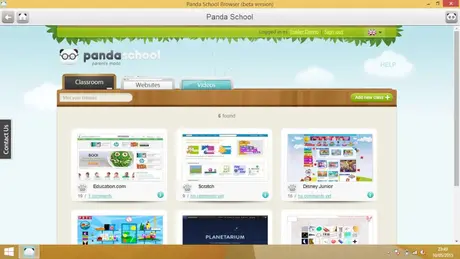
Panda School Browser Steam CD Key Platform: Steam Release Date: 22/05/2015 Product Description Panda School Browser is a browser for children which gives access strictly to a list of pre-approved websites and videos. Clicks on banners or other external links are simply ignored. The browser is developed especially for children, so it is very easy to use and encourages them to explore and study.
The collection of content is provided by «Panda School» web service which is free to use for everyone.You can take a look at the current collection here: https://steamcommunity.com/linkfilter/?url=http://pandaschool.org* The number of the websites and videos is constantly growing, as they can be easily added to collection by any member of community, at the same time content is strictly moderated by our staff.
Second important feature of the browser is the ability to completely prevent access to any other application on your computer while running in the the «Kids Mode». Exit from the «Kids Mode» is protected by PIN. Parents are free to choose which resources they want to add to their own «Classroom» but there is also a default set of hand-picked resources which provide high quality educational games for children of any age. Panda School Browser is easy to start with - no additional configuration needed.
Let your kids explore the internet on their own! Complete safety and lots of fun is guaranteed. P. S. Even our great application can hardly substitute parental involvement. Enjoy learning new things together with your child from time to time and you'll be truly amazed by the results. * Users from regions with censored internet access (e.g. Hong Kong) may use the website to check access to various resources System Requirements OS: Windows 7+ Processor: 1 GHz Memory:
Storage: 140 MB available space
Minimum and recommended specs when provided by the publisher or platform.
System requirements were not supplied for this product. Check the publisher store page or platform listing before purchase.
Redeem your digital key on Steam.
Keys are single-use. Confirm region and platform match your account (see hero details). Contact support if redemption fails.
Panda School Browser Steam CD Key
 Steam
In stock
Pay $3.27 with Visa or Mastercard — often delivered within minutes.


 Apple Pay
Google Pay


 Card payments by Stripe · Apple Pay / Google Pay where your device supports it
Earn balance from offers and pay with it — or use card/crypto.
We pass offerwall revenue back to you. Earn on CashVers, spend it here — or pay with card/crypto.