Steam
Add to Cart
Check activation region before purchase.
Redeem and play on Steam.
CD key / digital code after payment.
Ask support about a refund before revealing. Revealed keys can't be refunded.
About the game
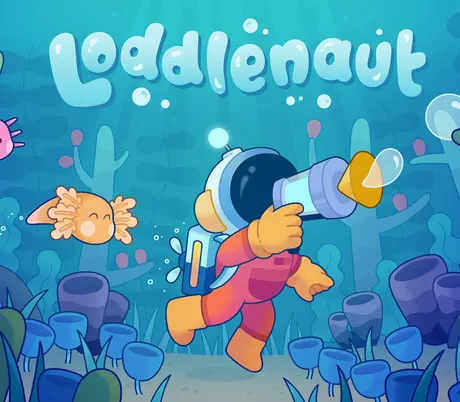
Loddlenaut is an ocean cleanup adventure set on a vibrant alien planet. Play as an interstellar custodian who is tasked with cleaning up the pollution left behind by spacefaring mega-corporation. Befriend local axolotl-like creatures and explore sunken corporate ruins as you revive the planet’s lush ecosystems.
Your mission: Clean up the ocean planet of GUP-14 after it was abandoned by GUPPI, a mega-corporation that makes and sells everything from soda to spaceships. When you first arrive on the planet, you’ll find yourself amid murky waters, oil spills, and scattered junk. Within the polluted environments, you’ll find remnants of GUPPI’s buildings, ships, and machinery all sunken to the ocean floor.
Discover clues about the planet’s past inhabitants as you clean up the mess they left behind using an assortment of high-tech gadgets.
As you clean up the planet, you’ll run into axolotl-like aliens known as “loddles.” Protect them from the polluted waters and feed them aquatic fruits while you make their planet habitable again. Depending on their diet, loddles will grow in different ways and develop unique traits and abilities that will further enable them to survive on this polluted planet. When the loddles are strong enough and the waters are cleaner, release them back into the wild and watch them thrive!
You may even come across eggs that you can incubate to raise more loddles. Features Explore an open-world alien planet Raise aquatic critters called “loddles” that grow based on what they eat Clean up icky goop and floating debris with your bubble gun Unlock special gadgets to clean different types of ocean pollution Recycle collected trash to craft useful items and upgrades
Minimum and recommended specs when provided by the publisher or platform.
Redeem your digital key on Steam.
Keys are single-use. Confirm region and platform match your account (see hero details). Contact support if redemption fails.
Loddlenaut PC Steam CD Key
 Steam
In stock
Pay $1.26 with Visa or Mastercard — often delivered within minutes.


 Apple Pay
Google Pay


 Card payments by Stripe · Apple Pay / Google Pay where your device supports it
Earn balance from offers and pay with it — or use card/crypto.
We pass offerwall revenue back to you. Earn on CashVers, spend it here — or pay with card/crypto.