
 EA App
Add to Cart
Earn balance eligible
F1 25 - 2026 Season Pack DLC PC EA App CD Key
Region
Region-free
Check activation region before purchase.
Platform
EA App
Redeem and play on EA App.
Product type
DLC add-on
CD key / digital code after payment.
Before you reveal
Key stays hidden
Ask support about a refund before revealing. Revealed keys can't be refunded.
Works on
- Windows
About the game
F1 25 - 2026 Season Pack DLC PC EA App CD Key
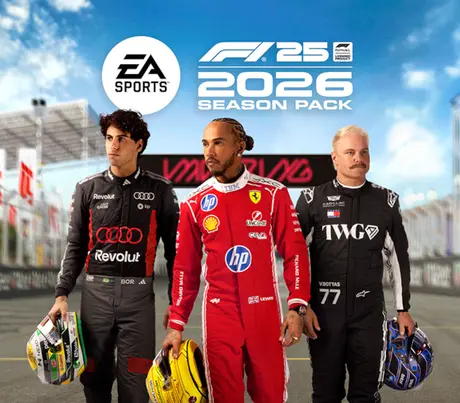
Rewrite the grid with the EA SPORTS F1 25: 2026 Season Pack. New teams Audi and Cadillac join the line-up, bringing a refreshed roster of drivers ready to challenge the field. Step into a new era with the groundbreaking 2026 cars, and take on the adrenaline-fuelled MADRING in the next generation of Grand Prix racing.
All New Teams: Two new teams join the 2026 grid: Audi, taking over Sauber, and Cadillac, marking the arrival of the first major American car manufacturer in Formula 1. New Driver Line-ups: Race against the latest driver line-ups. Racing Bulls welcomes Arvid Lindblad alongside Liam Lawson, Isack Hadjar joins Max Verstappen at Oracle Red Bull Racing, and fan favourites Valtteri Bottas and Sergio Pérez headline Cadillac’s entry. New Track: Get ready to race at MADRING†, the first new F1 circuit since 2023.
Set in Madrid, this hybrid street and purpose-built track will challenge you in high-speed action across 5. 4 km and 22 adrenaline-filled corners. New Cars and Regulations††: Feel the thrill of the 2026 F1 grid and get behind the wheel of lighter, smaller cars with cutting-edge active aerodynamics for a more responsive drive, whether you're using a gamepad or a wheel.
These next-gen cars, enhanced by F1 25's improved physics, offer exhilarating racing for both seasoned pros and newcomers ready to conquer the new F1 era. Custom teams and career saves from the 2025 season do not transfer to the 2026 season. Konnersport or APXGP teams cannot be added to the 2026 season of Driver Career or My Team.†MADRING circuit can only be driven with 2026 cars.††Some final car models will release in a post-launch update; internet connection required.
- Digital delivery — key appears in My orders
- Pay with Balance · Stripe · Crypto
- EA App key — redeem on EA App
System Requirements
Minimum and recommended specs when provided by the publisher or platform.
WINDOWS
How to Activate
Redeem your digital key on EA App.
- Download the EA App client from here. Click "Download EA app" (from the upper right corner) Install and start application, login with your Account name and Password. Click on My Collection and click on Redeem Code. Simply enter your game key in the activation field and click Next. Make sure that there are no spaces left before or after your code. After successful code verification go to the "MY GAMES" tab and start downloading.
Before you redeem
Keys are single-use. Confirm region and platform match your account (see hero details). Contact support if redemption fails.
F1 25 - 2026 Season Pack DLC PC EA App CD Key
DLC
In stock
$34.29
- Your price
- $34.29
- Redeem region
- Region-free
- Code delivery
- Often within minutes of payment, sometimes a few hours while we confirm it. Balance orders are checked by our team first. You'll see the status in My orders.
- Activate on
- EA App
Pay $34.29 with Visa or Mastercard — often delivered within minutes.


 Apple Pay
Google Pay


 Card payments by Stripe · Apple Pay / Google Pay where your device supports it
DLC — base game required.
Base game: F1 25 - 2026 Season Pack.
Earn balance from offers and pay with it — or use card/crypto.
- Delivered to your accountOften within minutes, sometimes a few hours while we confirm the payment. We email you when it's ready.
- Key stays hidden until you reveal itChanged your mind before revealing? Contact support about a refund. Revealed keys can't be refunded. Refund & delivery policy
- Secure checkoutCards are handled by Stripe and crypto by NOWPayments. We never see your card number.
Instant digital delivery
Key in your account seconds after payment
Verified key
Authorized supplier · guaranteed to work
14-day refund policy
Full refund on unused keys
EA App
Add to Cart
EA App
Add to Cart
 EA App
Add to Cart
 EA App
Add to Cart
EA App
Add to Cart
 EA App
DLC
Add to Cart
Battlefield 6 and REDSEC - Season 5 Starter Pack DLC Battlefield Pro DLC PC EA App CD Key
$24.69
Rest of world
Low stock
CashVers
$34.29
our price
HOW PRICING WORKS
We pass offerwall revenue back to you. Earn on CashVers, spend it here — or pay with card/crypto.


